
As high-performance desktop processors continue pushing thermal boundaries on modern socket architectures, all-in-one liquid cooling solutions have evolved from basic functional hardware into central visual foundations for flagship personal computer builds. The MSI MEG CoreLiquid E15 360 represents a distinct direction in this high-end cooling market, combining robust thermal dissipation engineering with a massive curved display module built directly into the water block assembly. Rather than evaluating liquid coolers strictly on raw radiator surface area or pump speed, enthusiast builders now weigh display customization, cabling convenience, software driver overhead, and long-term structural reliability during assembly.
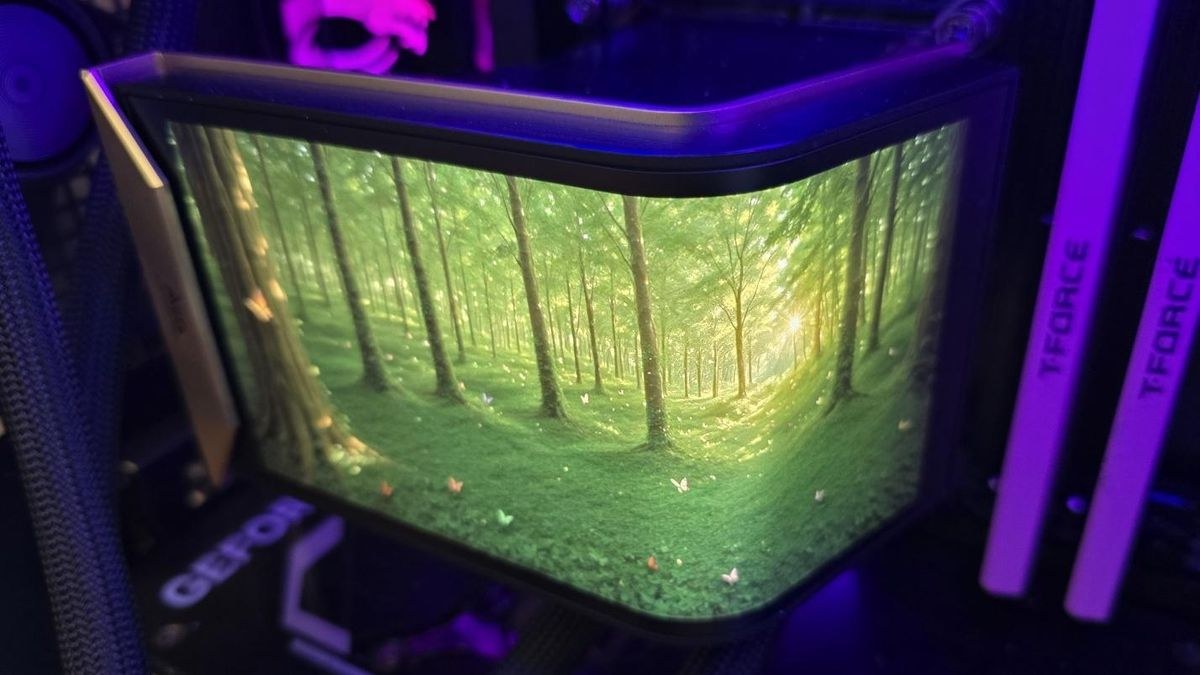
Integrating an active visual display directly onto a processor water block introduces physical and electronic complexities that extend far beyond traditional closed-loop cooling design. The MSI MEG CoreLiquid E15 360 attempts to establish a luxury visual standard by embedding a 6.67-inch curved AMOLED screen operating at an unusually detailed resolution of 2240×1080 pixels. This design choice converts the central CPU pump housing into a secondary Windows monitor. This raises key engineering questions regarding driver stability, panel survival under heat exposure, and software overhead.
Desktop cooling hardware has reached a point where aesthetic refinement must align with practical thermal performance. While traditional liquid loops focused almost exclusively on copper cold plate design and fluid flow rate, modern premium cooling units must satisfy demanding visual standards without compromising component reliability. Incorporating high-density digital display panels near sensitive pump motors requires sophisticated thermal isolation techniques to prevent ambient heat from degrading electronic components over years of continuous operation. Builders investing in top-tier cooling hardware must assess both immediate thermal cooling effectiveness and the long-term operational costs associated with proprietary software ecosystems.
Physical Architecture of the MSI MEG CoreLiquid E15 360
Historically, installing a 360mm liquid cooling radiator required individually aligning and securing three distinct 120mm cooling fans onto the aluminum frame. This traditional assembly process involved twelve separate mounting screws, along with a complex web of individual pulse-width modulation power cables and addressable RGB lighting connections that needed manual cable management. MSI addresses this specific mechanical friction point by incorporating a pre-installed, single-frame 360mm fan assembly directly onto the radiator. Combining three fan impellers within a single unified structural housing streamlines physical installation while eliminating unsightly cable clutter along top or front chassis mounting rails.
Beyond simplifying the initial hardware build process, single-frame fan structures significantly improve structural rigidity across the overall radiator housing. Eliminating the physical gaps that normally exist between individual 120mm fan frames reduces static pressure loss at the radiator boundary, forcing directed air evenly through the dense aluminum cooling fins. This structural integration proves particularly beneficial when operating inside fully enclosed desktop cases, where localized static pressure determines how effectively warm air escapes through restrictive dust filters and decorative mesh panels. The physical chassis dimensions of the cooling block, measuring up to 138.95 mm in width, 136.47 mm in depth, and 167.3 mm in height depending on shroud choice, require deliberate space planning within compact mid-tower enclosures.
Despite the substantial volume of the central pump housing, the physical clearance surrounding the CPU socket retention mechanism remains meticulously engineered. Oversized pump housings often create physical spatial conflicts with memory slots, preventing users from installing high-profile memory modules with tall passive heat spreaders. Modern high-frequency memory kits, such as TeamGroup Diamond Rose T-Force Xtreem DDR5-7200 modules, feature extended heat sinks that frequently bump against wide water blocks or low-hanging radiator tubing. The block geometry of this cooler adheres strictly to socket keep-out dimensions, ensuring full clearance across four-slot motherboard layouts for both DDR4 and DDR5 memory modules. Builders exploring modern visual output hardware can examine our analysis on the Asus ROG Strix XG32UQWMS 4K Tandem OLED review to understand how modern display technologies manage power and heat density.
AMOLED Display Integration and Software Control Frameworks
The primary visual feature of this liquid cooler is its integrated 6.67-inch curved AMOLED display panel. AMOLED display technology provides virtually infinite contrast ratios and true black levels because self-emissive subpixels switch off completely when displaying dark pixels, allowing on-screen graphics to merge seamlessly with dark computer case interiors. However, positioning an emissive organic light-emitting diode panel directly adjacent to a heat-generating processor pump creates notable engineering trade-offs. Electronic components mounted near liquid cooling blocks experience elevated operating temperatures and continuous micro-vibrations generated by the mechanical impeller pump motor.
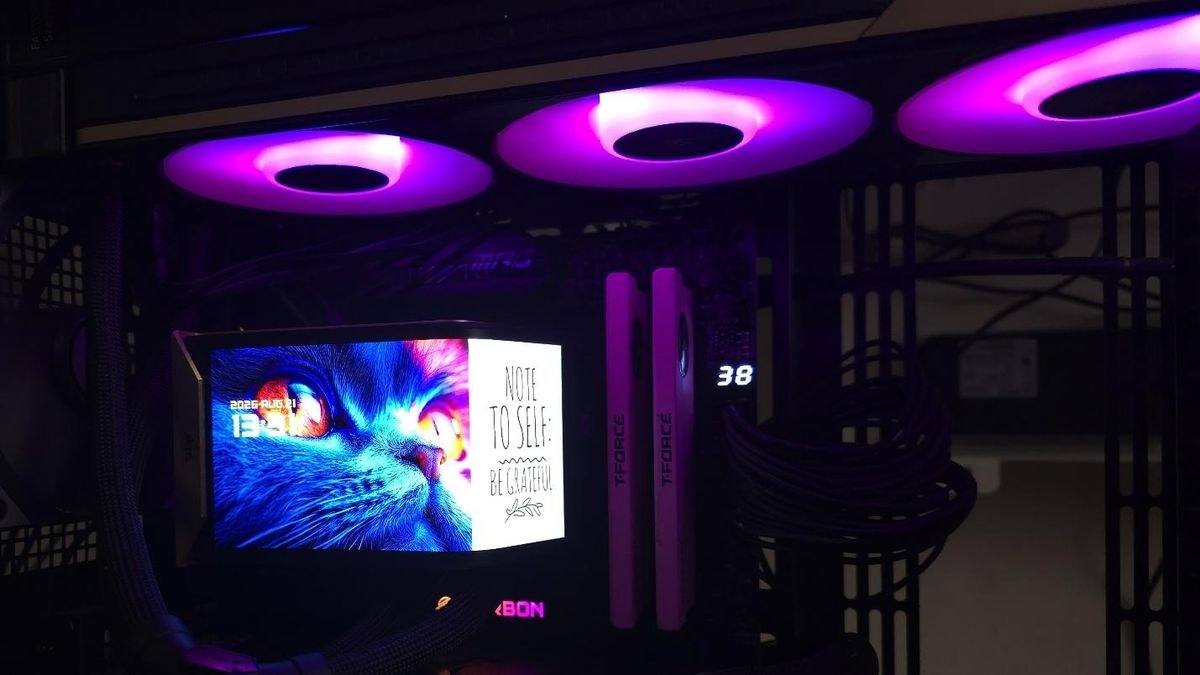
To address potential panel degradation and thermal wear over extended usage cycles, the manufacturer splits warranty coverage into two distinct tiers. Core liquid cooling components, including the pump motor, aluminum radiator, and sealed rubber tubing, carry a comprehensive six-year warranty. Meanwhile, the integrated curved AMOLED display module is covered by a separate two-year warranty plan. This warranty distinction highlights the physical reality that high-density display screens operating in high-heat environments carry different operational lifespans than traditional mechanical cooling hardware.
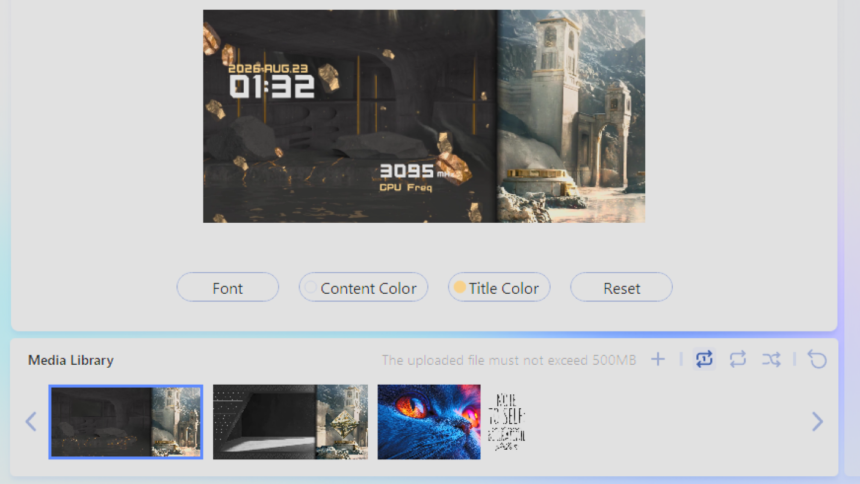
Software control for the display screen relies on the proprietary MSI EZ Display suite, which offers three primary operational frameworks: Full Screen, Split-Screen, and Extended Mode. When operating in standalone hardware mode without background software running, the display panel renders a default hardware-based animation depicting a geometric Penrose triangle against a stylized background. This standalone execution capability ensures that users who prefer lightweight operating system environments without resident background utilities can maintain a high-end visual appearance without devoting system memory to monitoring applications.
When the software application is active, users gain access to real-time hardware monitoring overlays that display real-time central processing unit temperatures, graphics card thermal metrics, operating clock frequencies, and local clock time. However, current software builds present noticeable customization constraints that limit enthusiast flexibility. Text alignment and telemetry font sizing are restricted to fixed coordinates on the screen, preventing users from repositioning metrics over custom background images. Furthermore, animation playlist management currently forces automatic cycling through all loaded visual files, lacking simple toggle switches to lock a single graphic in place without manually removing other media files from the local storage folder.
Windows Display Topology and Digital Rights Management Conflicts
The most flexible yet technically complex setting available within the software suite is Extended Mode, which exposes the 2240×1080 AMOLED panel directly to the Windows operating system as an active secondary monitor. In this configuration, the display behaves exactly like an external desktop screen, allowing users to stretch system diagnostic dashboards, browser windows, custom video loops, or full-screen monitoring applications directly over the CPU block. While this feature opens up extensive aesthetic customization, treating an embedded cooler screen as a native Windows display device introduces deep display stack conflicts within modern graphics drivers.
During practical daily operation, activating Extended Mode can trigger unexpected High-bandwidth Digital Content Protection (HDCP) handshake failures across multi-monitor display configurations. HDCP is an encrypted digital copy protection protocol enforced by commercial streaming platforms and graphics card drivers to prevent unauthorized recording of protected video streams. When the internal 2240×1080 screen registers alongside a high-resolution primary desktop monitor, such as an ultrawide LG panel connected via DisplayPort, protected media applications on streaming services like Amazon Prime Video fail to establish a secure hardware path. Consequently, the streaming platform downgrades video playback to basic definition or halts video playback entirely on the main monitor.
This HDCP handshake breakdown illustrates a widespread architectural challenge in how computer hardware manufacturers integrate secondary auxiliary displays. When Windows identifies an internal USB-driven display controller as a standard display output, the graphics driver incorporates that auxiliary device into the total system encryption pipeline. If the auxiliary display controller lacks hardware-level HDCP encryption keys, the graphics driver lowers the security classification for the entire system, degrading streaming video quality across all connected monitors. System builders dealing with unexpected background utility behavior can read our detailed report on Windows 11 RGB lighting gaming crashes to see how background drivers impact operating system stability.
Resolving secondary monitor display path issues often requires manual driver intervention or disabling auxiliary display modes entirely during media consumption. For users who rely on their desktop computers for both high-end gaming and high-definition video streaming, these digital rights management quirks introduce genuine operational friction. Hardware manufacturers must work closely with display controller vendors and graphics driver developers to ensure that auxiliary hardware screens do not compromise core system media capabilities. Until unified display standards address embedded USB monitors, builders using Extended Mode must remain aware of potential digital rights management compromises.
Thermal Platform Dynamics and Dual-CCD Processor Behavior
Evaluating liquid cooling performance on modern desktop processors requires a detailed understanding of multi-die silicon architecture and localized thermal density. On current socket platforms such as AMD AM5, thermal behavior varies substantially between standard multi-core processors and specialized stacked-cache variants. Testing cooling efficiency across high-end chips like the AMD Ryzen 9 9950X compared to the V-Cache equipped AMD Ryzen 9 9950X3D reveals fundamental differences in how heat transfers from silicon dies to the cold plate. The standard Ryzen 9 9950X features two Core Complex Dies that experience thermal asymmetry during compute tasks, where one die regularly operates ten degrees Celsius higher than its neighbor due to unequal power distribution.
In contrast, the AMD Ryzen 9 9950X3D demonstrates a more balanced thermal profile across its dual-die layout. Vertically stacked 3D V-Cache silicon modifies overall heat conduction paths, requiring the copper cold plate of the cooler to draw heat uniformly across the entire integrated heat spreader rather than concentrating solely on localized hot spots. Testing CPU coolers inside fully assembled, enclosed computer cases—such as modern crossflow chassis like the Tryx FLOVA F50 fitted with side intake fans and high-pressure Noctua NF-A12 G2 fans—delivers realistic thermal performance data compared to open-air test benches. Open test environments tend to artificially inflate cooling performance by understating internal ambient temperature buildup and ignoring airflow resistance from dust filters.
Achieving optimal thermal transfer across the processor socket depends heavily on precise physical mounting execution. The installation procedure requires removing the pre-installed motherboard plastic retention hooks and anchoring dedicated metal mounting brackets directly to the stock socket backplate. Applying thermal compound in a balanced grid pattern ensures that the micro-channel copper cold plate achieves uniform, high-pressure mechanical contact across both compute dies beneath the integrated heat spreader. Once the pump assembly is secured using spring-tension thumbscrews, builders can mount the curved AMOLED display module or swap to an alternative black-and-gold decorative top shroud provided in the hardware accessory box.
The inclusion of modular mounting hardware and alternative top shrouds demonstrates a thoughtful approach to physical customizability. However, hardware innovation must be matched by ongoing software refinement. While single-frame radiator fans and wide RAM compatibility streamline physical PC assembly, the software driving screen telemetry and secondary monitor behaviors must mature to resolve media playback conflicts on primary displays. Detailed firmware revisions and official utility updates for this cooling platform are maintained directly on the MSI official portal for hardware documentation.
As desktop computer components continue blending extreme compute performance with elaborate visual customization, all-in-one liquid coolers will increasingly be judged on overall ecosystem maturity rather than raw thermal dissipation alone. Embedded curved AMOLED panels set a striking visual standard for flagship PC builds, but their real-world value depends on software updates that eliminate display pipeline conflicts and expand telemetry customization for demanding hardware builders.